Getting started: your first board #
This guide builds a small library model one step at a time, from a single slice to a model your team can track work in. Each step is a complete TEML document that you can paste into the TEML Viewer, which draws the board as you type.
For each step you can either:
- press Copy, open the viewer at tools.teml.org, select everything in the editor on the left, and paste, or
- press Open in viewer to load the step straight into the viewer.
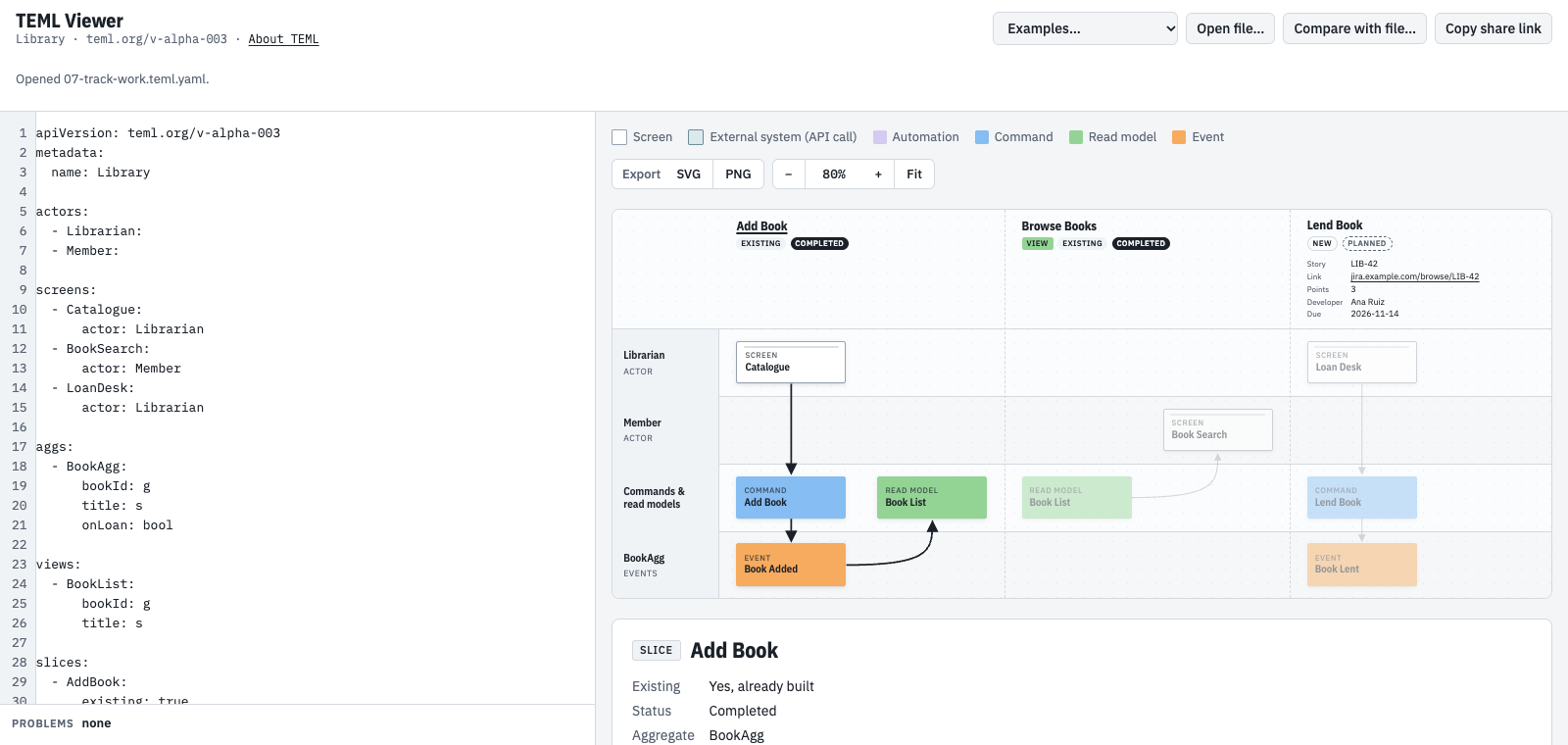
The screenshot under each step shows what the viewer draws.
1. A first slice #
A slice is one step on the timeline: something is asked for (a command) and something is recorded (an event). The smallest slice names its events:
slices:
  - AddBook:
      events: [BookAdded]
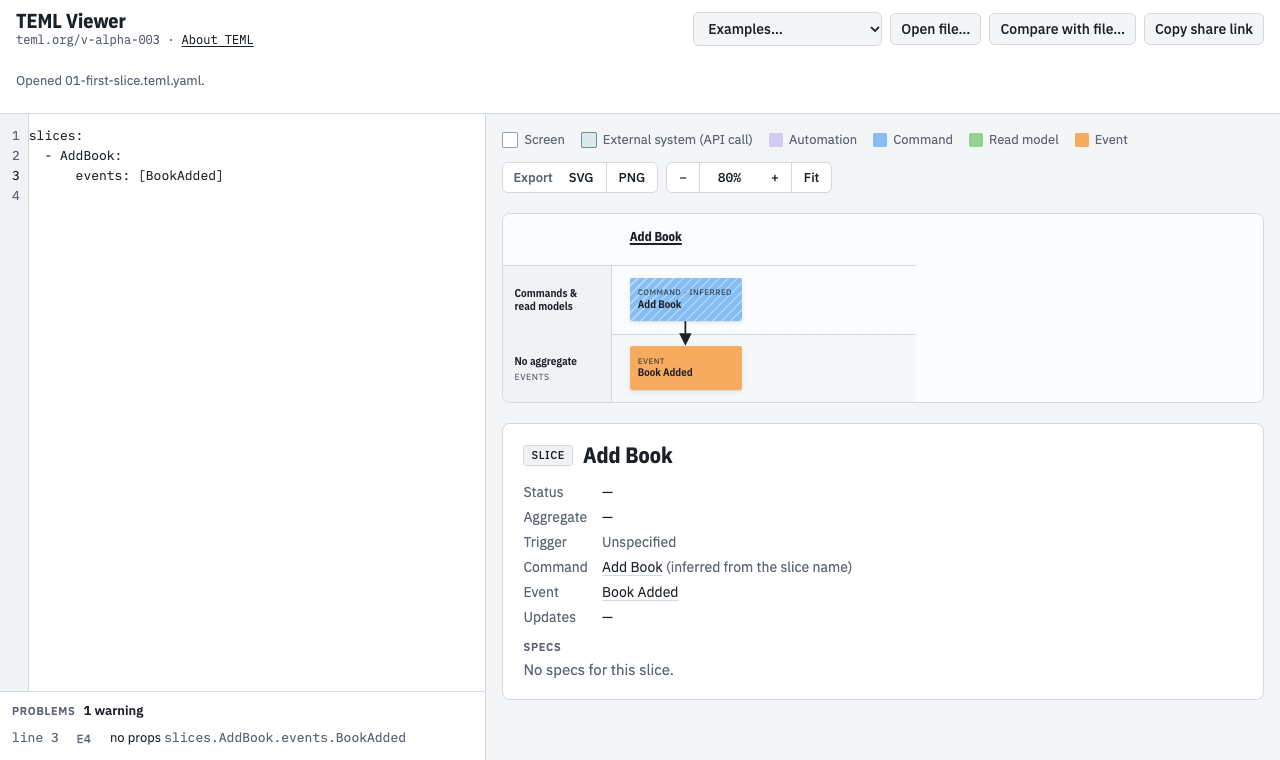
The board draws Add Book as a blue command and Book Added as an orange event. The command is striped because it is inferred: you didn’t write one, so it is named after the slice.
The Problems list under the editor shows a warning. That’s fine: this is a sketch, a quick draft that leaves out details such as the event’s data. Sketches only ever get warnings.
2. Add the data #
An aggregate is the part of the system that handles a command and records its events. Here the book aggregate keeps a book’s id and title, and the event carries the same two properties:
aggs:
  - BookAgg: [bookId, title]

slices:
  - AddBook:
      agg: BookAgg
      events:
        - BookAdded: [bookId, title]
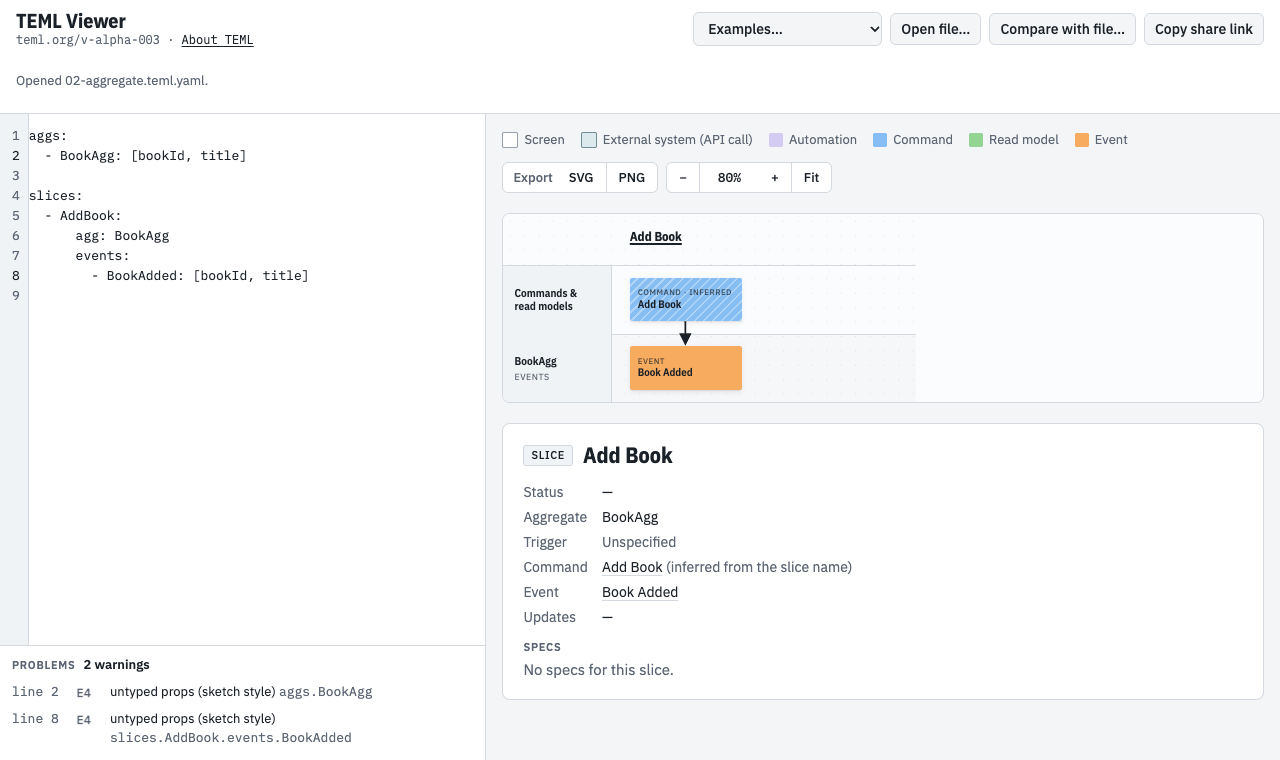
Each aggregate gets a lane at the bottom of the board, and its events sit in that lane.
3. Say who does it #
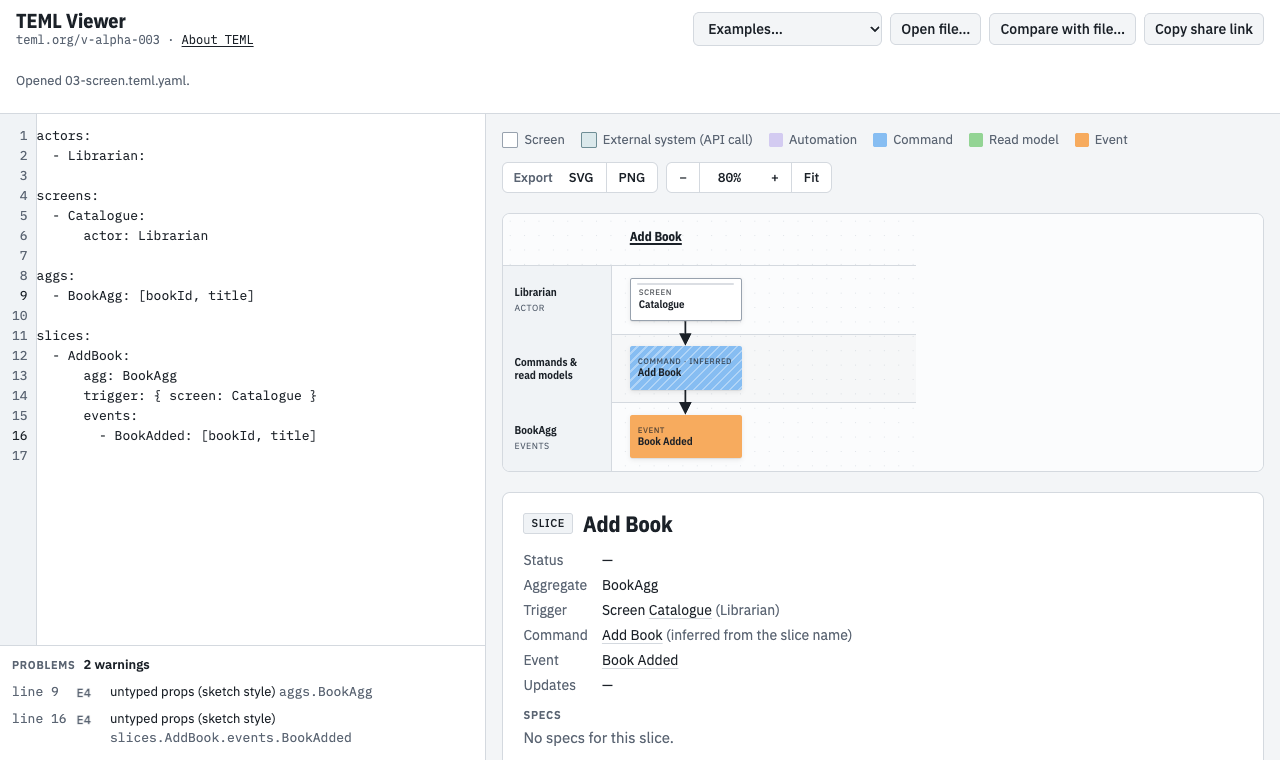
People reach the system through screens. An actor is a person or role; each actor gets a lane across the top, holding their screens. The slice’s trigger names the screen the command comes from:
actors:
  - Librarian:

screens:
  - Catalogue:
      actor: Librarian

aggs:
  - BookAgg: [bookId, title]

slices:
  - AddBook:
      agg: BookAgg
      trigger: { screen: Catalogue }
      events:
        - BookAdded: [bookId, title]
4. Show the data on a screen #
A read model (a view) is data shaped for a screen. The slice’s views says which read models its events update. A second kind of slice, a view slice, says where a read model is read:
actors:
  - Librarian:
  - Member:

screens:
  - Catalogue:
      actor: Librarian
  - BookSearch:
      actor: Member

aggs:
  - BookAgg: [bookId, title]

views:
  - BookList: [bookId, title]

slices:
  - AddBook:
      agg: BookAgg
      trigger: { screen: Catalogue }
      events:
        - BookAdded: [bookId, title]
      views: [BookList]

  - BrowseBooks:
      view: BookList
      readBy:
        - screen: BookSearch
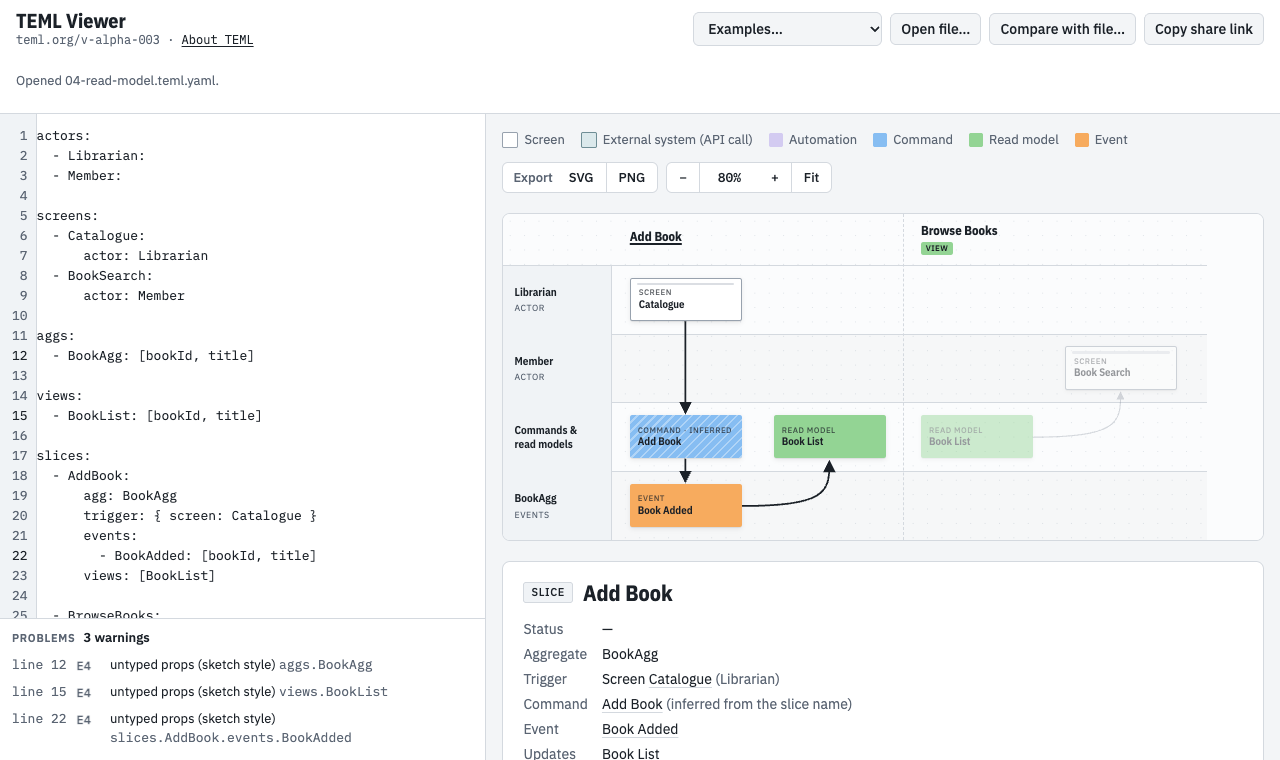
Information flows left to right: the event updates Book List, and in the next column the member’s Book Search screen reads it. View slices are tagged View.
5. Add another slice #
Slices run left to right in the order you list them. Lending a book is a new slice. The book aggregate handles it too, because whether a book can be lent depends on that book’s own history; onLoan is part of the book’s state:
actors:
  - Librarian:
  - Member:

screens:
  - Catalogue:
      actor: Librarian
  - BookSearch:
      actor: Member
  - LoanDesk:
      actor: Librarian

aggs:
  - BookAgg: [bookId, title, onLoan]

views:
  - BookList: [bookId, title]

slices:
  - AddBook:
      agg: BookAgg
      trigger: { screen: Catalogue }
      events:
        - BookAdded: [bookId, title]
      views: [BookList]

  - BrowseBooks:
      view: BookList
      readBy:
        - screen: BookSearch

  - LendBook:
      agg: BookAgg
      trigger: { screen: LoanDesk }
      events:
        - BookLent: [bookId, loanId, memberId]
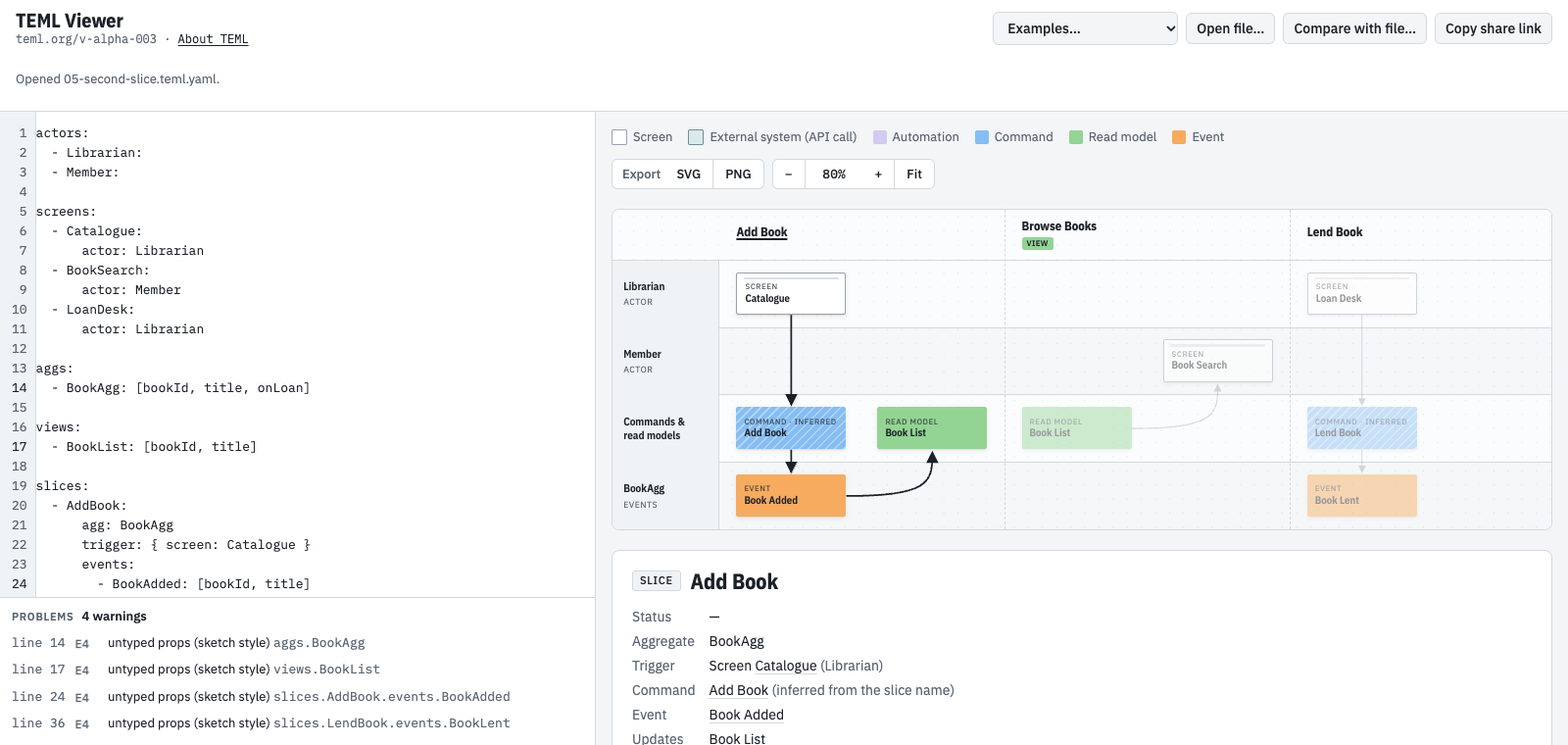
Click any sticky or slice heading on the board to see its details below the board. On a narrow screen, scroll the board sideways to see every slice.
6. Make it compliant #
When the model is ready for other tools, such as code generators, make it compliant: add the apiVersion and metadata header, give every property a type, and write each command’s data. The short types are g (an id), s (text), int, dec, bool, date, dt (date and time) and any.
apiVersion: teml.org/v-alpha-003
metadata:
  name: Library

actors:
  - Librarian:
  - Member:

screens:
  - Catalogue:
      actor: Librarian
  - BookSearch:
      actor: Member
  - LoanDesk:
      actor: Librarian

aggs:
  - BookAgg:
      bookId: g
      title: s
      onLoan: bool

views:
  - BookList:
      bookId: g
      title: s

slices:
  - AddBook:
      agg: BookAgg
      trigger: { screen: Catalogue }
      command:
        AddBook: { bookId: g, title: s }
      events:
        - BookAdded: { bookId: g, title: s }
      views: [BookList]

  - BrowseBooks:
      view: BookList
      readBy:
        - screen: BookSearch

  - LendBook:
      agg: BookAgg
      trigger: { screen: LoanDesk }
      command:
        LendBook: { bookId: g, loanId: g, memberId: g }
      events:
        - BookLent: { bookId: g, loanId: g, memberId: g }
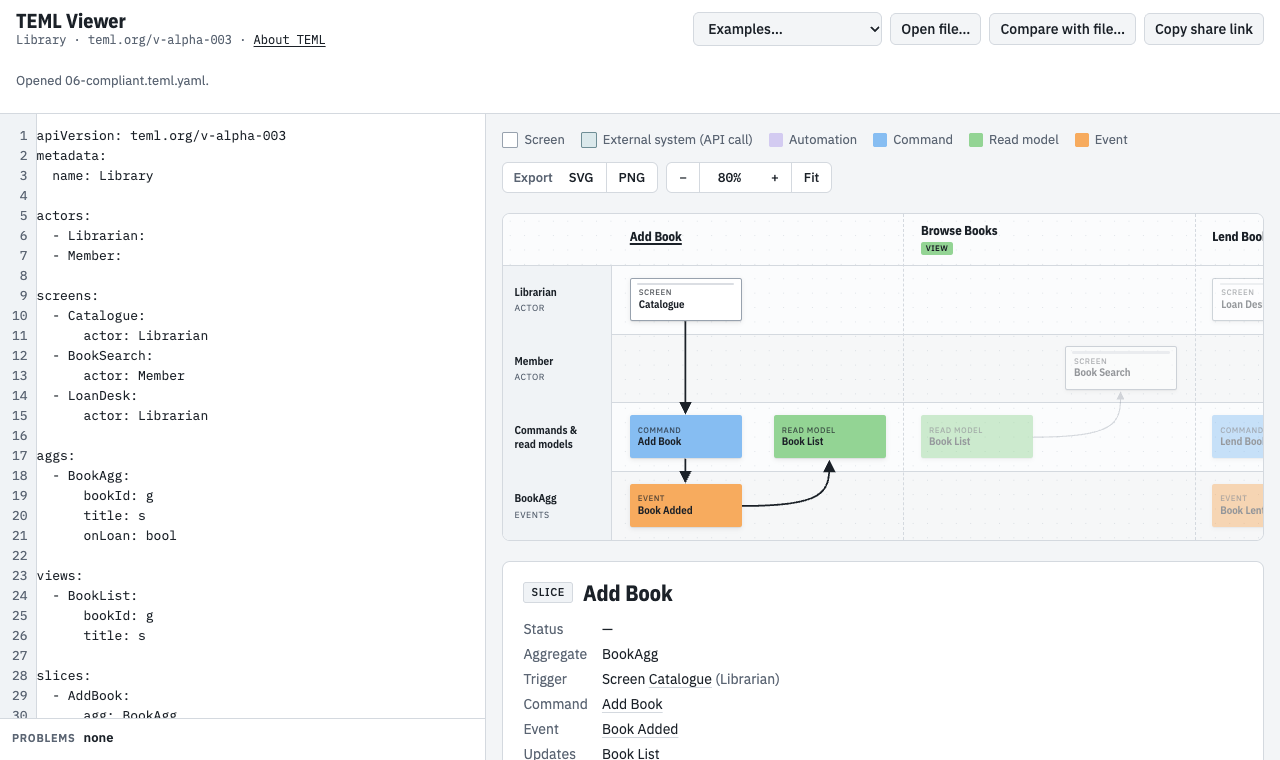
In a compliant model, problems are errors. Here is the same model with two mistakes, title: string instead of title: s, and a misspelled aggregate:
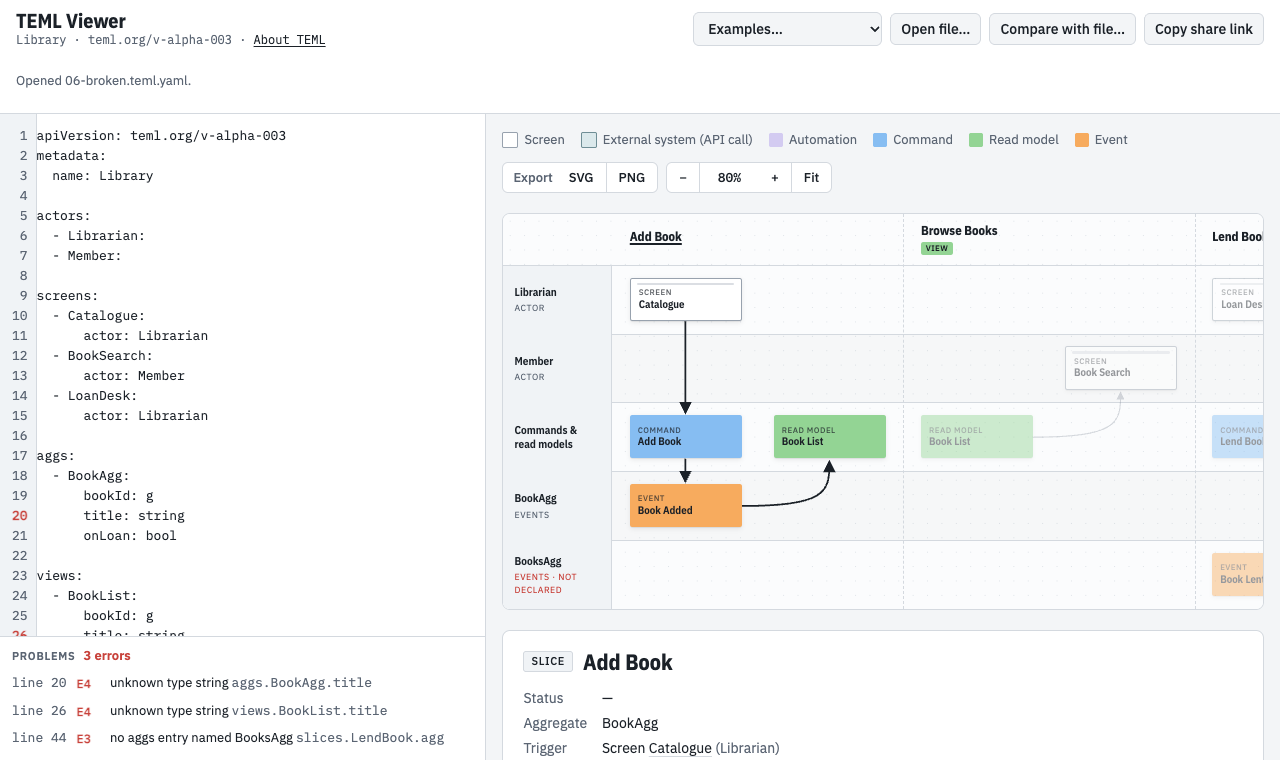
Each problem has its line number; click it to jump there. The board still draws what it can, and puts anything it can’t find in a lane marked not declared.
7. Track the work #
Slices can say how far along they are, whether they already exist, and anything else your team keeps on them:
status: the work state, such asPlanned,InDevorCompleted.existing: true: the slice is already built. Leave it out for a new slice. An existing slice can still bePlannedwhen it needs changes, which are usually less work than a new slice.meta: any information you want shown at the top of the slice, such as the story, a link, effort points, the developer and the due date. Use any names you like. Quote dates, as in"2026-11-14".
apiVersion: teml.org/v-alpha-003
metadata:
  name: Library

actors:
  - Librarian:
  - Member:

screens:
  - Catalogue:
      actor: Librarian
  - BookSearch:
      actor: Member
  - LoanDesk:
      actor: Librarian

aggs:
  - BookAgg:
      bookId: g
      title: s
      onLoan: bool

views:
  - BookList:
      bookId: g
      title: s

slices:
  - AddBook:
      existing: true
      status: Completed
      agg: BookAgg
      trigger: { screen: Catalogue }
      command:
        AddBook: { bookId: g, title: s }
      events:
        - BookAdded: { bookId: g, title: s }
      views: [BookList]

  - BrowseBooks:
      existing: true
      status: Completed
      view: BookList
      readBy:
        - screen: BookSearch

  - LendBook:
      status: Planned
      meta:
        Story: LIB-42
        Link: https://jira.example.com/browse/LIB-42
        Points: 3
        Developer: Ana Ruiz
        Due: "2026-11-14"
      agg: BookAgg
      trigger: { screen: LoanDesk }
      command:
        LendBook: { bookId: g, loanId: g, memberId: g }
      events:
        - BookLent: { bookId: g, loanId: g, memberId: g }
8. Describe the behaviour #
Specs describe how a slice behaves, in Event Modeling’s Given / When / Then form: given these events already happened, when this command comes in, then these events are recorded, or the command is refused with an error.
Given is always a list of past events, never the aggregate’s state. The book aggregate has no stored “on loan” flag to set up. It works out onLoan by replaying its events: Book Lent sets it, and Book Returned clears it. So Lend Book’s rule, “only lend a book that is on the shelf”, takes three specs: one on the shelf, one out on loan, and one that was lent and then returned. This step adds a Return Book slice for the last one:
apiVersion: teml.org/v-alpha-003
metadata:
  name: Library

actors:
  - Librarian:
  - Member:

screens:
  - Catalogue:
      actor: Librarian
  - BookSearch:
      actor: Member
  - LoanDesk:
      actor: Librarian

aggs:
  - BookAgg:
      bookId: g
      title: s
      onLoan: bool

views:
  - BookList:
      bookId: g
      title: s

slices:
  - AddBook:
      existing: true
      status: Completed
      agg: BookAgg
      trigger: { screen: Catalogue }
      command:
        AddBook: { bookId: g, title: s }
      events:
        - BookAdded: { bookId: g, title: s }
      views: [BookList]

  - BrowseBooks:
      existing: true
      status: Completed
      view: BookList
      readBy:
        - screen: BookSearch

  - LendBook:
      status: Planned
      meta:
        Story: LIB-42
        Link: https://jira.example.com/browse/LIB-42
        Points: 3
        Developer: Ana Ruiz
        Due: "2026-11-14"
      agg: BookAgg
      trigger: { screen: LoanDesk }
      command:
        LendBook: { bookId: g, loanId: g, memberId: g }
      events:
        - BookLent: { bookId: g, loanId: g, memberId: g }
      specs:
        - name: lends a book that is on the shelf
          given:
            - BookAdded: { bookId: b-1 }
          when:
            LendBook: { bookId: b-1, loanId: l-1, memberId: m-1 }
          then:
            - BookLent: { bookId: b-1, loanId: l-1, memberId: m-1 }
        - name: won't lend a book that is out
          given:
            - BookAdded: { bookId: b-1 }
            - BookLent: { bookId: b-1, loanId: l-1 }
          when:
            LendBook: { bookId: b-1, loanId: l-2 }
          then:
            - error: BookAlreadyLent
        - name: lends a book again once it is returned
          given:
            - BookAdded: { bookId: b-1 }
            - BookLent: { bookId: b-1, loanId: l-1 }
            - BookReturned: { bookId: b-1, loanId: l-1 }
          when:
            LendBook: { bookId: b-1, loanId: l-2, memberId: m-2 }
          then:
            - BookLent: { bookId: b-1, loanId: l-2, memberId: m-2 }

  - ReturnBook:
      status: Planned
      agg: BookAgg
      trigger: { screen: LoanDesk }
      command:
        ReturnBook: { bookId: g, loanId: g }
      events:
        - BookReturned: { bookId: g, loanId: g }
      specs:
        - name: returns a book that is out
          given:
            - BookLent: { bookId: b-1, loanId: l-1 }
          when:
            ReturnBook: { bookId: b-1, loanId: l-1 }
          then:
            - BookReturned: { bookId: b-1, loanId: l-1 }
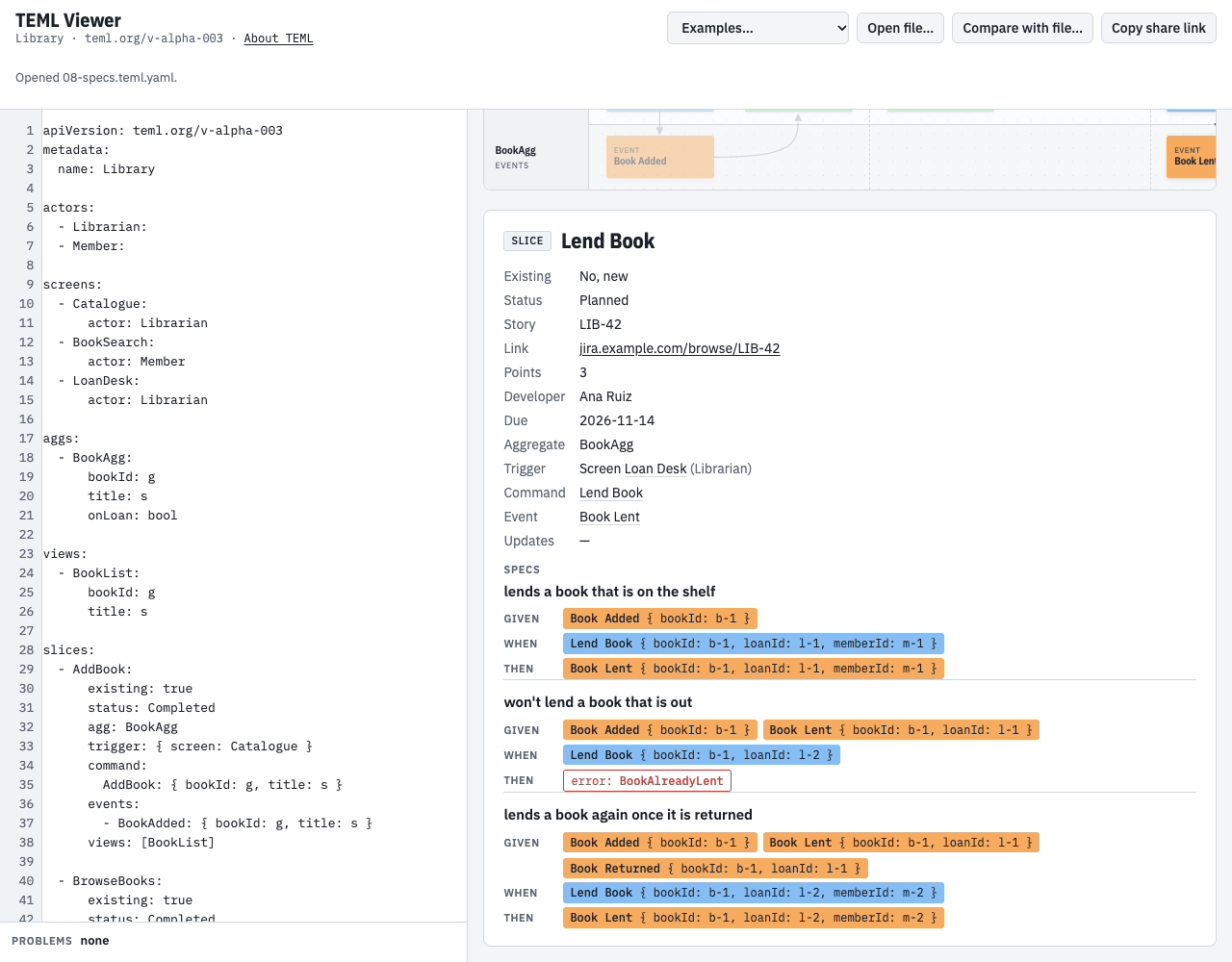
Click Lend Book on the board to see its specs in the panel.
This is also why the book aggregate decides: it sees every loan of the book. An aggregate per loan would start empty for each new loan, and could never tell that the book was already out.
What next #
- Share it: Copy share link in the viewer puts the whole model in a link.
- Export it: the SVG and PNG buttons above the board download a picture of it.
- Compare versions: Compare with file… marks the slices added or changed since an earlier version.
- Learn more: the Introduction tours the language, the demos show larger models, and the Specification has every rule.