The Event Modeling Language (TEML) #
Sketch your idea, see the big picture, build with confidence.
Write down how your software should work, in plain text that business people and developers can both read. TEML turns that text into a picture of the whole system, so everyone agrees on the same picture before anything is built. Because it’s text, the picture lives next to the code and changes with it.
Start the way Event Modeling always has, like sticky notes on a wall: a few steps, roughly named. Add the precise details later, only when it’s time to build.
See it in one minute #
A customer places an order, the system records it, and a confirmation email goes out. Drawn as an Event Model, that story looks like this:
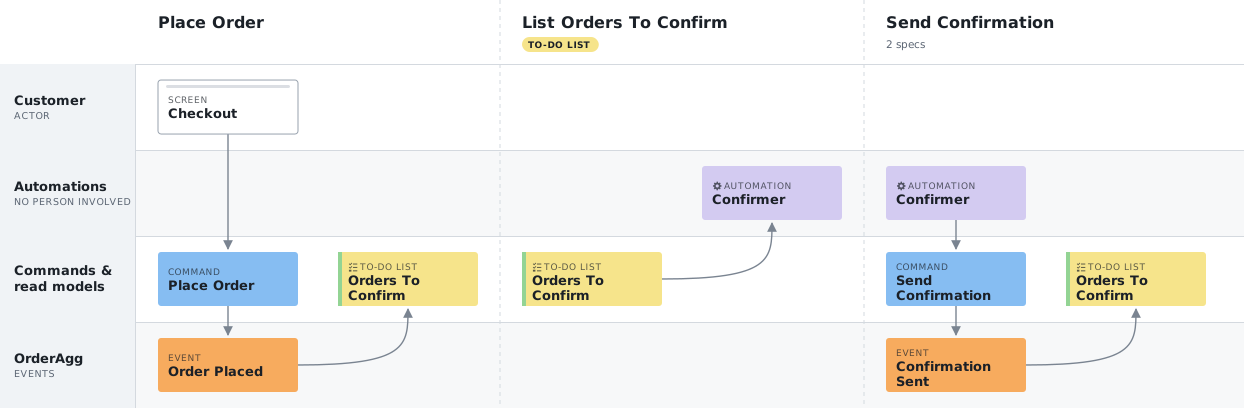
Read it left to right, one column per step:
- Place Order. The customer presses order on the Checkout screen. That sends a command, and the system records an event: Order Placed.
- List Orders To Confirm. The new order lands on a to-do list, which the Confirmer reads. The Confirmer is an automation: no person is involved.
- Send Confirmation. The Confirmer sends the email and records Confirmation Sent, so the order leaves the list and is never confirmed twice.
That picture is drawn from text. Nobody drew boxes or arrows. You can start with a sketch as short as this, which draws almost the same board:
slices:
  - PlaceOrder:
      trigger: { screen: Checkout }
      events: [OrderPlaced]
      views: [OrdersToConfirm]

  - ListOrdersToConfirm:
      view: OrdersToConfirm
      readBy: [automation: Confirmer]

  - SendConfirmation:
      trigger: { automation: Confirmer }
      events: [ConfirmationSent]
      views: [OrdersToConfirm]
A sketch is enough to agree on the story. When it’s time to build, the same story becomes precise: what each step carries, and examples of how it behaves. See the precise version.
Zoom out, zoom in #
The board is the big picture: every step of the story in order, and who or what takes part in each. Click a step and you zoom in to its details: what the screen sends, what’s recorded and the examples that pin down how it behaves (given this happened, then that follows). You can always zoom back out, so you never lose sight of where the details fit.
From a business need to software #
TEML sits halfway between everyday words and code: anyone on the team can read it, and tools can check it. So less is lost in translation between the people who ask for software and the people who build it. Here is the order example again, as a team would use it:
- Describe the need. “Customers should get an email confirming each order, and never two.”
- Model the behaviour. Together, lay out the steps, the screen, what’s recorded and who acts. That’s the board above, with examples that pin down “each order” and “never two”.
- Keep the model as text.
order.teml.yamllives in Git next to the code. A change to it goes through a pull request like any other, and the TEML GitHub Action shows the change slice by slice. - Connect it to development. Today,
teml checkcatches gaps in the model, and each step’s given / then examples tell developers what to build and test. Later, tools could use a complete model to help write those tests and the code. That’s the direction TEML is heading; it doesn’t do it yet.
Do this with your own project #
Pick the path that fits you. Both work from the same board, so the whole team sees the same picture.
For project managers and business analysts #
You don’t need to write any YAML to work from an Event Model.
- Read a board. Explore the order example, or the bigger demos. Click a step to see its user story and the examples that say how it should behave.
- Agree on behaviour. Each step’s examples read as given this happened, when someone does this, then that follows. See describe the behaviour.
- Track the work. Mark each step as planned, in progress or done, with the user story and ticket next to it. See track the work.
- See the screens. Attach a sketch or mock-up of each screen to the steps that use it. See show the screens.
For developers #
The model is a text file that lives in Git next to the code.
- Write one. The Getting started guide builds a small library system step by step, from a first sketch to a complete, checked model.
- See it as you type. The TEML Viewer draws the board and lists problems live. It can open a model from GitHub and commit your changes back.
- Review it like code. The TEML GitHub Action comments on each pull request that changes a model: what changed, slice by slice, with the board before and after.
- Know the rules. The Specification (v-alpha-003, a working draft) and its JSON Schema for editors and tools. A Simple Example and the Introduction to TEML are shorter tours.
Have your own software project in mind? #
TEML’s author can help you work out what your software needs to do, model it with you, then build it in small, well-defined pieces, one slice at a time. Clarity first, building second, with TEML as the method. You don’t need any of this to use TEML: the language and tools are free.
Let's talk about your projectThis opens a public discussion on GitHub, so share only what you’re happy for others to read.
Where TEML is today #
TEML is young: the language is an alpha draft, and the tools around it already work.
Works today
- The language, v-alpha-003: write a quick sketch or a complete, checked model, split it across files if it grows, and get autocomplete in editors from the JSON Schema.
- The TEML Viewer: the board as you type, problems listed live, each step’s details and examples, screen wireframes, an ER diagram, comparing two versions, share links, opening from GitHub and committing back, and SVG or PNG export.
- The
temlcommand:teml checkreports problems,teml renderdraws the board as SVG andteml diffdescribes what changed between two versions. It runs anywhere with Node 18 or later:curl -fsSLO https://tools.teml.org/teml.mjs. - The TEML GitHub Action: a comment on each pull request that changes a model.
Still changing
- The language. Names and structure can still change, as they did from v-alpha-002 to v-alpha-003. While TEML is in alpha, accepted changes update the current draft. Each model names the draft it follows in its
apiVersionline. - What comes next is decided by real use. A change to the language starts from a concrete need; see how to propose one.
Not yet
- Generating tests or code from a model.
- Producing a model from existing code.
Help shape TEML #
TEML is open source, and right now the most useful help is feedback on the language itself, from people using it on real work.
- Tell us where it falls short. Write a model for something real. If TEML can’t express what it needs, or only awkwardly, open an issue on Teml-spec with a short snippet. That’s how the language changes: each change starts from a concrete need (how proposals work).
- Share an example. A real or realistic model, and what was hard to write, helps decide what comes next. Post it as an issue on Teml-spec too.
- Fix small things. Typos, unclear wording, broken links and mistakes in examples don’t need an issue first. Open a pull request on Teml-spec or on this website.
- Report problems with the tools. For the GitHub Action, use its issues. The viewer’s and the
temlcommand’s code isn’t public yet, so report those on this website’s issues.
What is Event Modeling? #
Event Modeling is a way of describing how information flows through a system, step by step, as a story told over time. The system can be a software application or a real-world process. The board above is an Event Model.
The method was developed by Adam Dymitruk, and its official homepage is eventmodeling.org.
Why text? #
Graphical tools are good for sharing an Event Model, but drawing and keeping one up to date takes time, and they’re hard to use for people with hand limitations or who rely on a screen reader. Writing the model as text helps:
- Faster to write and change. Typing is quicker than placing boxes, and TEML is based on YAML, so it’s simple to read.
- Accessible. Plain text works with a keyboard alone and with screen readers.
- Kept with the code. The model lives in Git next to the software, so changes are reviewed, compared and versioned like code.
- Ready for tools. Tools can read the model to draw it, check it and, later, help produce tests and code.
TEML can be written in two ways:
- Sketch: start here. Get ideas out of your head quickly, without filling in every detail.
- Compliant: when it’s time to build, refine the sketch into a complete, checked model that tools can rely on.
Mission of TEML Org #
The Event Modeling Language Org exists to:
- Create a formalized textual language for defining an Event Model.
- Develop and promote an agreed-upon standard for Event Modeling.
- Enable the design and implementation of tools for Event Modeling.
TEML is an open-source project. The specification and examples live in TEML-Org/Teml-spec, and this website in TEML-Org/teml-org-site.